

Your team’s creative home
Get the most out of your media by consolidating your organization’s entire asset library into a central hub.
ShareBrowser is a shared platform where everyone on the team can search, organize, and share a vast and growing media library. Think of it as a home base for all your video files, photos, graphics, and more.

Search for anything
Editors, managers, producers… Anyone on your team can search and find exactly what they’re looking for across network and cloud storage workspaces. Users can search by tags, comments, custom fields, and video-specific metadata such as name, codec, frame rate, modified date, resolution, and other file attributes.
ShareBrowser can index your entire storage infrastructure—including EVO shared storage and other network storage devices in your facility—helping you find what you need no matter where that file is located.

Organize files
Your media team can easily organize and share files using ShareBrowser bins, without creating duplicates and filling up space on your storage.

Preview your media
With ShareBrowser’s integrated player, you can preview your media to see if you’ve found the right shot, even if the file is offline, archived, or in the cloud.

Adobe Premiere Pro and After Effects
ShareBrowser panel for Adobe Video applications

Blackmagic Design DaVinci Resolve
ShareBrowser workflow integration plug-in for DaVinci Resolve teams

Apple Final Cut Pro
ShareBrowser extension for FCP editors and macOS-based creative workflows
Avid Media Composer
Bin locking and project/ media sharing for Media Composer workflows



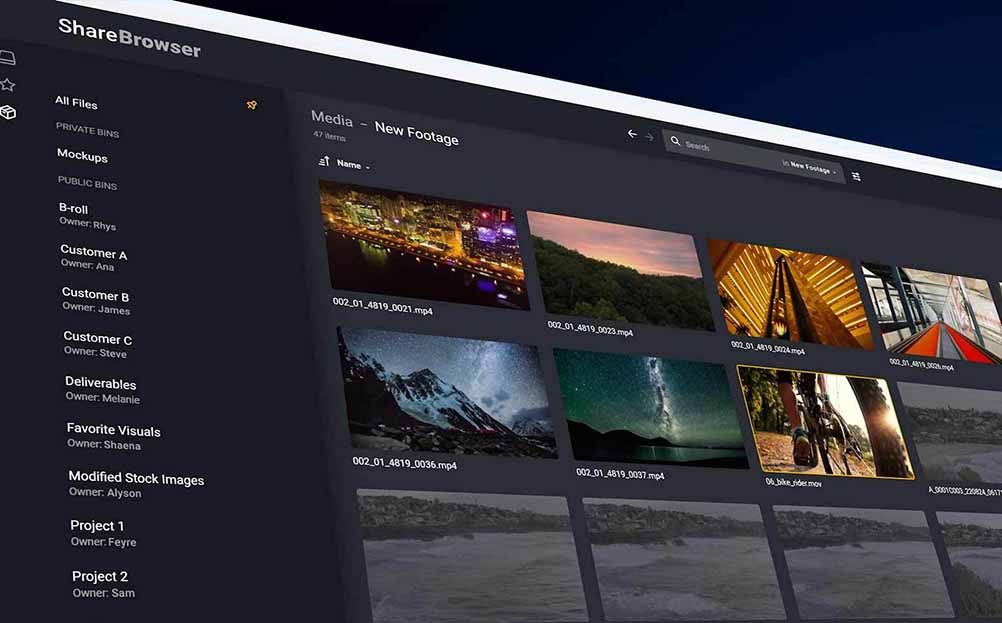

Favorite folders up front
Tired of navigating seven folders deep to get to the same project file every day? ShareBrowser lets you save a shortcut to your favorite folders—on EVO or elsewhere—so they’re never more than a click away.

Markers and subclips
With markers and subclips in ShareBrowser, you can add timecode-accurate comments to any media clip, making it easier to find not just the right clip, but the right moment within that clip.
Learn more.

Share your search
When you search in ShareBrowser, you can easily share the results of that search with anyone on your team.

Keyboard shortcuts
Type more, click less. Keyboard shortcuts in ShareBrowser make it easy to navigate, search, tag, comment, preview, play, pause, and even scrub through your media in the ShareBrowser interface without moving your mouse.

Download proxies
Need a proxy file, fast? Use ShareBrowser to download proxies on your machine. No additional software required.

Automatic mount and unmount
ShareBrowser can automatically mount volumes when you log in based on your previously mounted shares. It can also unmount all shares when you log out of the system as a security measure for shared devices.

Attach metadata and proxies automatically
When you import media into your project file from the ShareBrowser Adobe, Resolve, or FCP integration, you aren’t just importing your video clips. Each file’s metadata comes into your project, and associated proxy files can be downloaded, imported, and attached automatically as well.

Data verification
Nothing slows down a workflow like a corrupt or missing file. When you use ShareBrowser’s “paste & verify” feature, you can rest assured that your files will arrive safely at their intended destination.

Archival integration
Easily archive and restore archived media from directly within ShareBrowser media asset manager.
Learn more.

API included
Integrate your media and metadata with any system in your workflow. ShareBrowser includes a robust API for users and developers to build custom integrations at no additional cost.

Automatic project locking
ShareBrowser features a customizable automatic project locking system to prevent collaborators from saving over the top of each other and overwriting in-progress work.
Automatic project locking works for various media applications and file types, such as Premiere Pro and Final Cut Pro projects, Photoshop and Illustrator files, and more.

Unlimited users
ShareBrowser comes included for unlimited users. No subscriptions or license fees required.

Intuitive and easy to use
ShareBrowser MAM is designed for intuitive use, allowing you to jump right in without the need for extensive training. However, if you’d like to dive deeper, a variety of training materials are available to guide you through every feature.

See everything, everywhere
ShareBrowser is not only your team’s primary way of accessing EVO workspaces. It also acts as a “single pane of glass” through which your team can see all of your organization’s media, both on EVO and across your storage environment.

Runs inside EVO
ShareBrowser’s “magic” happens automatically inside your EVO. Indexing, cataloging, proxy generation, metadata, etc.—everything runs within your EVO hardware or EVO Cloud instance. There is no additional MAM server required, and no monthly user licenses to keep track of.

Runs inside EVO
ShareBrowser MAM is part of the award-winning EVO Suite, a fully integrated collection of workflow tools included with EVO shared storage.